MG
MyGarage

Shop software you own

Your garage.
Your data.
Your software.

Plan builds around the tools you own, the manuals you trust, and the decisions you've already made. MyGarage is an AI workshop OS. It catalogs your tools, plans your builds against your own sources, and talks to your machines.

It runs on one computer you already have — a Mac in the house, a spare desktop in the shop — and you use it from your phone, tablet, or any other computer on your home network, at the bench or on the couch. Not in someone else's cloud. The internet can go down. The subscription can't lapse. There isn't one.

$49once — early-adopter price. Yours forever.

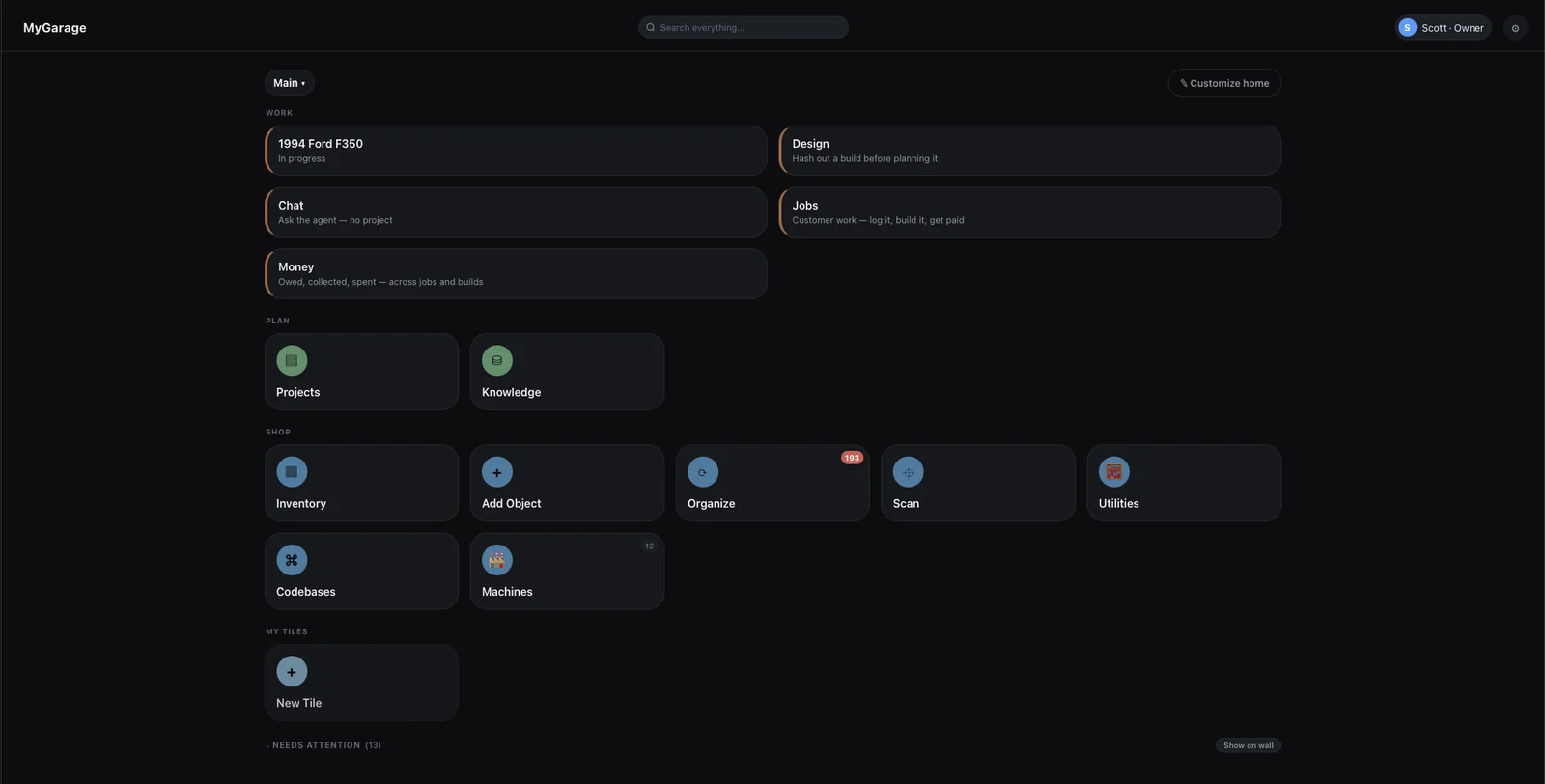
The MyGarage home screen: tiles grouped Work, Plan and Shop — a truck in progress, design, chat, jobs and money; projects and knowledge; inventory, add object, organize, scan, utilities, codebases and machines.

The whole shop on one screen — what you're building, what you know, and what you own.

How it goes

01

Set up your shop

Catalog the tools, consumables, machines and vehicles you already have — by talking, by photo, or by typing. Or start with one project: its manual and the handful of tools it needs. The catalog grows job by job, and everything after this knows what you own.

02

Plan your projects

Collect the manuals and sources that matter, then turn an idea into a plan grounded in them and checked against your shelves before you start buying.

03

Execute your designs

Wiring diagrams drawn from the design, solvers written for your build, cut lists, firmware, and settings staged to your machines. What you designed becomes what you actually make.

The Garage

SHOP PLAN WORK LEARN EVERY PROJECT MAKES IT SMARTER
Shop

Give MyGarage an accurate model of where your work happens.

  • Catalog your tools by talking — voice, photo, or text. MyGarage knows what tools you have, plans around them where it can, and tells you up front when a task needs something you don't own
  • Find anything in seconds — bins, racks, drawers, kits; ask out loud what drawer your compression tester is in, and when you last used it
  • Stock that counts — consumables with quantities, reorder thresholds, and an audit trail
  • Labels that scan — print a QR for a bin, a kit, or a machine; scan it to pull up the record
  • Machines and vehicles — first-class records with service schedules, not just list rows

Here's the one that got me. A tool I haven't needed in a year is in a drawer somewhere, and I can spend longer finding it than the job takes. Happens more than I'd like to admit. If you put things away, MyGarage knows where it is. If you didn't, it still remembers the last job you used it on — and that's usually enough to jog your memory.

Plan

Turn an idea into a plan grounded in your shop and trusted evidence.

  • Your own sources, grounding the work — PDFs, web pages, and videos you collect, with MyGarage helping you find the good ones, become what your project designs and plans are built from
  • Plans that check themselves — milestones, tasks, and steps, then an audit pass that flags what's missing, with citations
  • Checked against your inventory — the tool list knows what you own and what you'd need to buy
  • Design first, and remember why — talk a build through and the design doc writes itself; the alternatives you rejected are kept alongside it with the reason and the date, so next year's you doesn't relitigate this year's call
  • Utilities — solvers for your shop — when a build needs real engineering math, you or your assistant describe the calculation and MyGarage writes the solver: a page you drive with sliders, and a tool the agent calls while planning, same formulas in both. It's versioned, every run is recorded with the numbers that went in, and you can read the math and argue with it
  • Drawings from the decisions — wiring diagrams and schematics drawn from what the design settled, every run labelled with its gauge, assumptions listed where a reader can check them. Parts it generates export as STEP, so keep drawing in Fusion or FreeCAD if that's where you draw; the files live with the project either way

Four kinds of knowledge meet here: what's in your shop, what trusted sources say, what the project needs, and what past work taught you.

Work

Stay oriented while the real job unfolds.

  • "What's next?" — hands-free guidance with the specs and tool locations for the step you're on
  • Reality gets recorded — complications, substitutions, and discoveries land in the project, not your memory
  • Machines, safely — MyGarage stages the settings; anything that starts heat or motion is a button on the machine itself, pressed by you
  • Pick up where you stopped — the plan, the step you were on, and what you found out are still there weeks later
Learn

Every project makes the shop smarter.

  • Sessions become knowledge — completed work drafts wiki entries; nothing becomes authoritative without your approval
  • Build stories and reusable plans — what you actually did, photo-illustrated, ready to share or repeat
  • History feeds the next plan — proven methods and service records ground future projects

MyGarage is the system of record. You choose the assistant.

Use the built-in voice and chat, or connect ChatGPT, Claude, or any MCP-capable agent directly to your shop — same inventory, same projects, same knowledge, your pick of brains.

And you don't have to be a programmer. Pick your assistant in Settings, press Copy config, paste it where the page tells you, restart. Claude, Codex, ChatGPT and Grok each get their own steps.

One real machine, start to finish

The powder coat oven in my shop is the proof. It was designed in MyGarage — every decision recorded with its reason, every rejected alternative kept alongside — and the build plan came out of that design. Its controller firmware lives there too, as code MyGarage can read, version, and compile.

Now I run it through the same system that helped build it. I say: "Look up the spec sheet for this powder and add it to the powder coat oven." That's the whole instruction. It finds the manufacturer's data sheet, files it where I can cite it later, reads the cure schedule off the page, and loads it on the oven. Nothing heats up. I rack the parts, walk over, and press Start on the oven itself. While it runs, MyGarage watches the zones, and my phone buzzes when the cure completes — the oven saying so, not a kitchen timer. The schedule that produced a good finish is saved; the next batch is one tap.

That's the loop. A machine the shop designed, built, and now talks to.
What it looks like

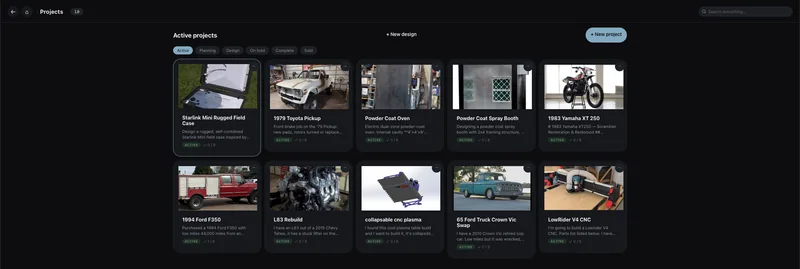
The projects page showing ten active builds as photo cards — a Starlink field case, a 1979 Toyota pickup, a powder coat oven, a spray booth, a 1983 Yamaha XT 250, a 1994 Ford F350, an L83 engine rebuild, a folding CNC plasma table, a 65 Ford Crown Vic swap and a LowRider V4 CNC — with filters for Active, Planning, Design, On hold, Complete and Sold.
Everything you're in the middle of. A front brake job and a ground-up scrambler build are the same kind of thing here — a photo, a description in your own words, and how far through it you are. Ten live at once, filtered by Active, Planning, Design, On hold, Complete or Sold, because a shop is never doing one thing.
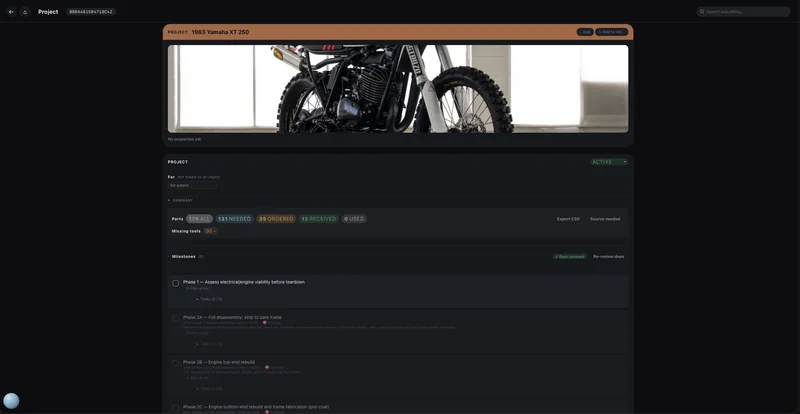
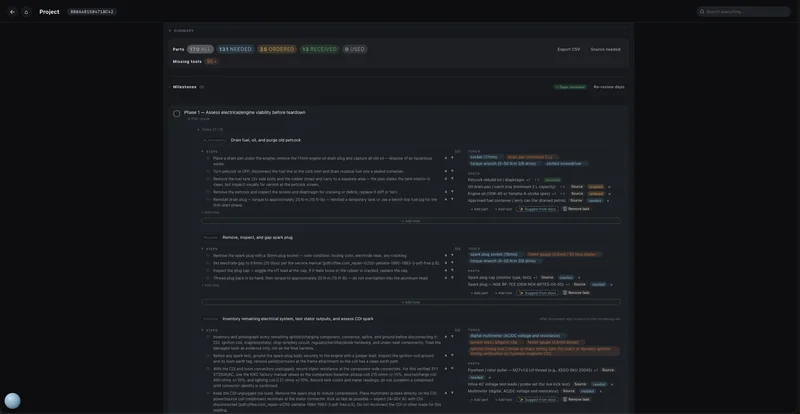
A build, held in one place. Not a session — the project itself, sitting there between the days you work on it. Left: eight phases, several blocked until the one before them finishes, and 179 parts already sorted into 131 still needed, 35 ordered, 13 arrived. Right: the same plan opened up, where every task carries its own steps — each citing the page of the service manual it came from — the tools that task needs, and its own parts you can source without leaving the row. Walk away for three weeks and the plan is still here, still knows where it stopped.
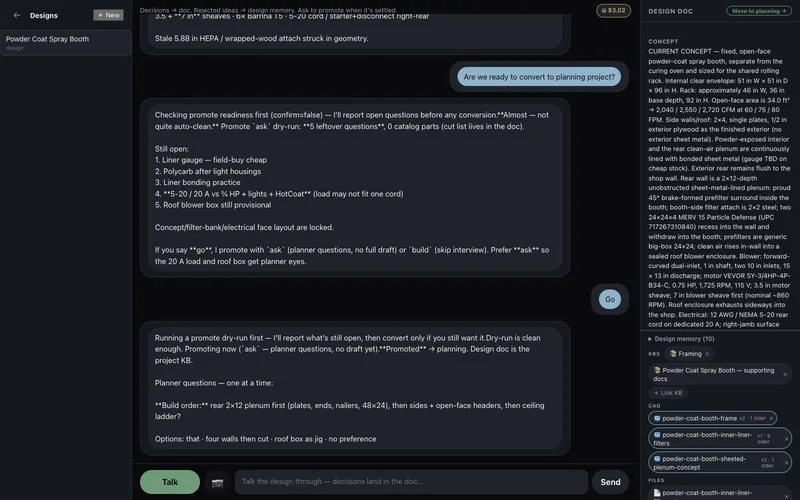
The design console for a powder coat spray booth: the conversation on the left where the agent runs a promote readiness check and lists five still-open questions, and on the right the design doc it has been writing — internal envelope, airflow in CFM, blower and motor specs, wiring — with linked knowledge bases, three CAD models carrying version histories, and a design-memory count of ten.
Talk the build through; the doc writes itself. This is the spray booth being designed — not notes about the design, the design. Every decision you settle lands in the doc on the right: internal envelope, airflow in CFM, blower and motor, the wiring. Ask to move it to planning and it checks first, and here it pushes back — five leftover questions, liner gauge, the 20 A load, the roof blower box still provisional — and offers to promote anyway or send those to the planner. It knows what it hasn't settled.
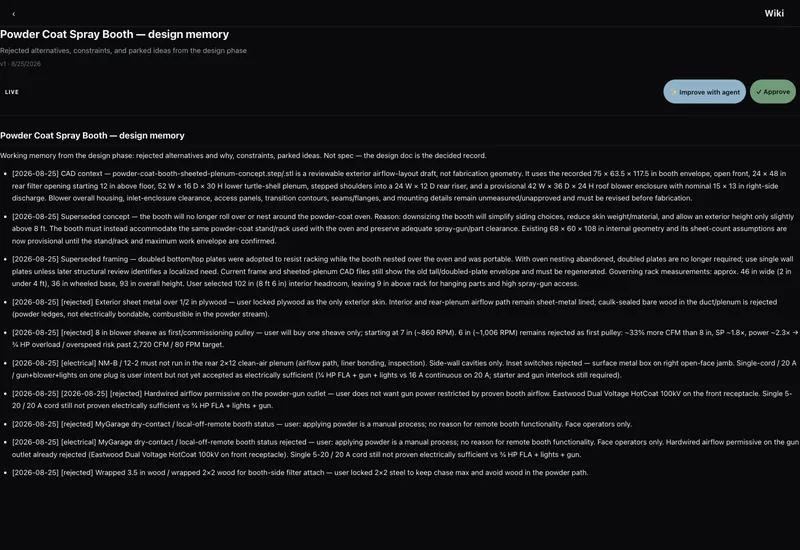
The design memory for a powder coat spray booth: dated entries marked rejected, superseded or electrical, each carrying the reason — plywood-only skin, an 8 inch blower sheave that would overload the motor, wood in the powder path.
And it remembers what you ruled out. Same booth, the other half of that conversation. Not just the decision — the alternatives you rejected and why, dated, so next year's you doesn't relitigate this year's call. The 8″ blower sheave that would have overloaded the motor. Wood in the powder path. The plenum that stopped nesting over the oven, and everything that assumption invalidated. It's working memory, kept separate from the decided spec, and nothing here becomes shop knowledge until you approve it.
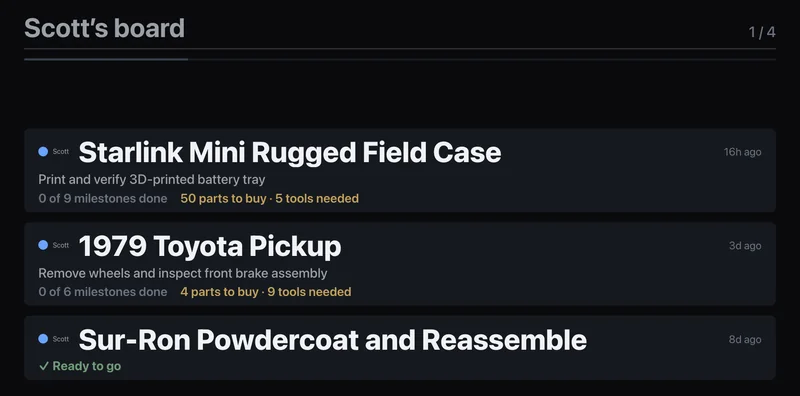
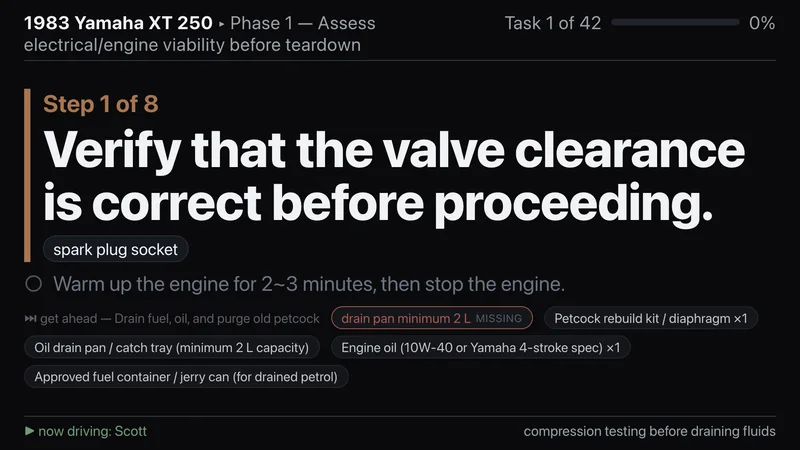
Put it on the wall. Hang any TV or spare monitor in the shop and point it at MyGarage. Idle, it's the walk-in board — every build, the next thing each one needs, and what's stopping it, in type you can read from the far bench. Send a session to it and the same screen becomes the step in front of you, one at a time, the tool it takes, and a look ahead at the next task — here already flagging the drain pan you don't own. Greasy hands, no phone out of your pocket, nothing to unlock.
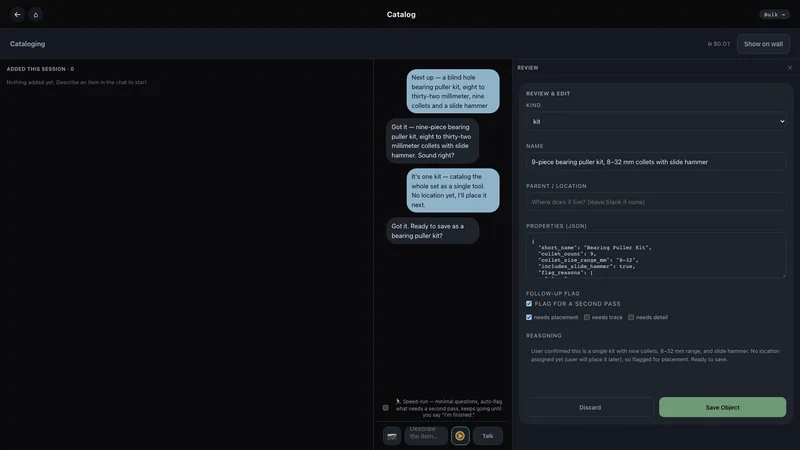
Cataloging a bearing puller kit by voice, with the parsed record shown for review before saving.
Catalog by talking. Describe the kit; it parses the record and shows you exactly what it will save before it saves it.
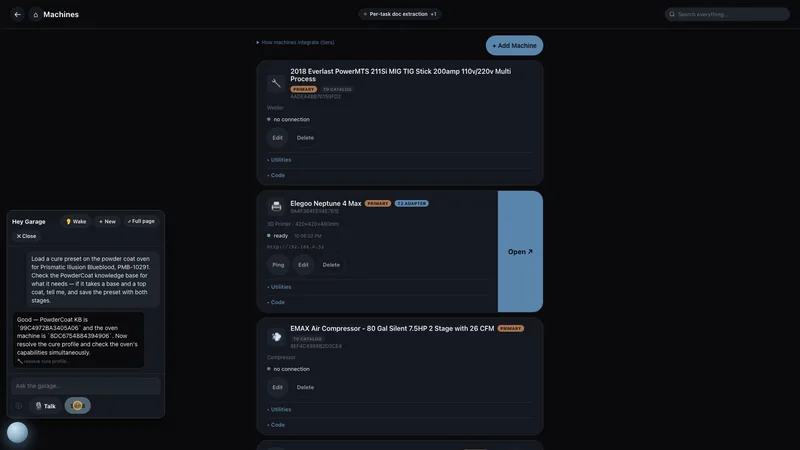
The machines page listing a welder, a 3D printer and an air compressor, each with its own state.
Your machines, as records. Welder, printer, compressor, oven — each one a real object with its own manuals, settings and history.
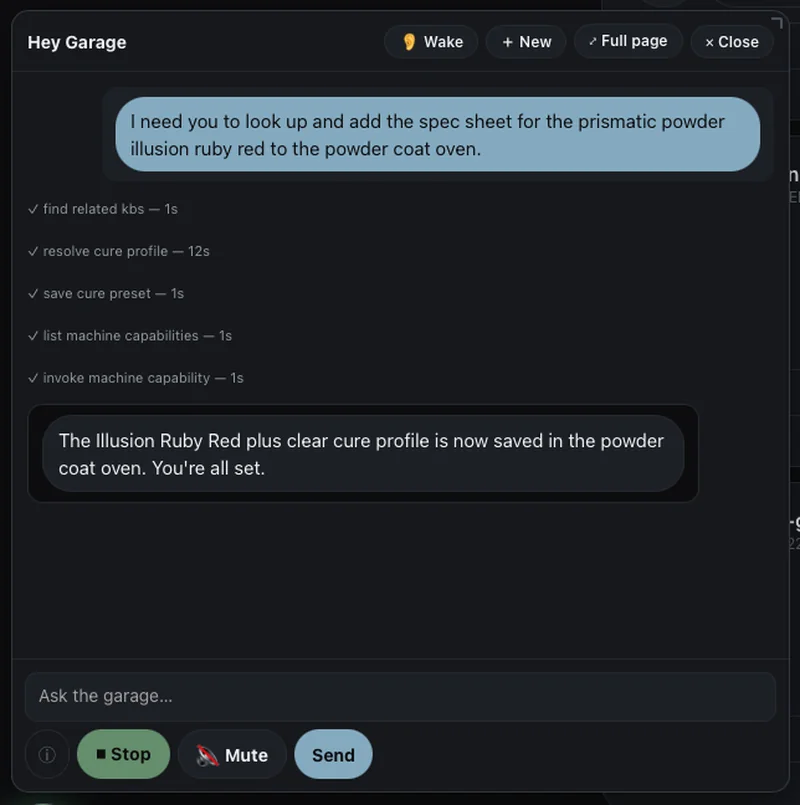
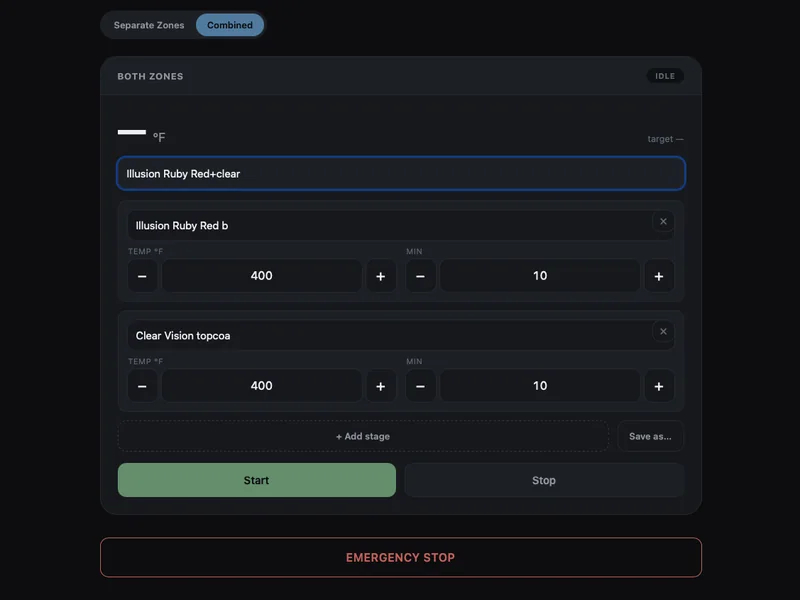
One sentence, then the oven has the preset. Left: the actual ask, spoken to the sphere while looking at the Machines page — look up the spec sheet for this powder and add it to the oven. Five steps you can watch it take: find the right knowledge base, read the cure schedule off the data sheet, save it as a preset, ask the oven what it can do, hand it over. Right: the oven a minute later — base coat and clear topcoat, 400°F for 10 minutes each, sitting idle. Start is a button on the oven itself, and you press it.
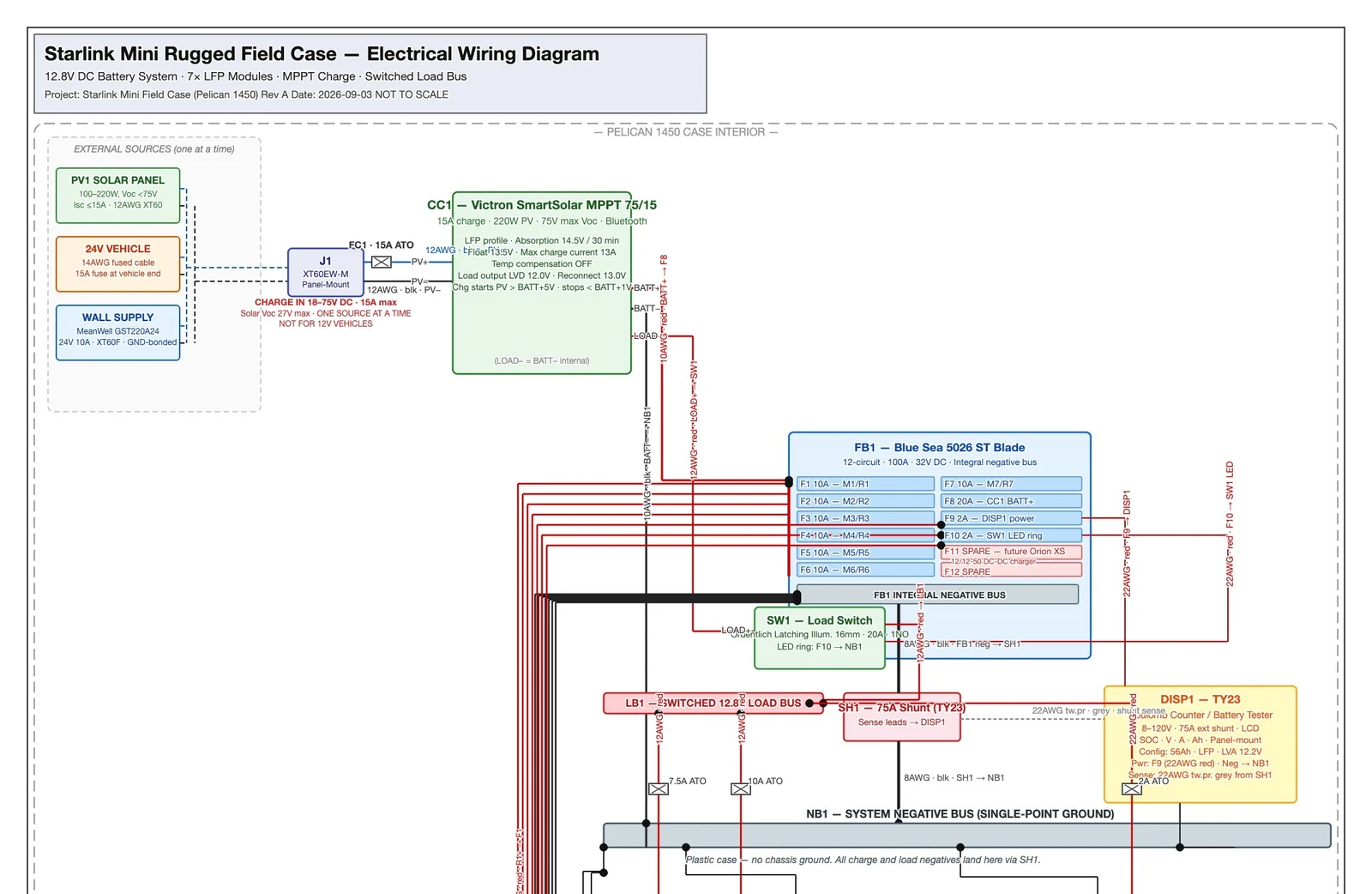
An electrical wiring diagram drawn by MyGarage: seven battery modules, a fuse block with per-circuit ratings, a charge controller, and labelled wire gauges on every run.
And it drafts. This wiring diagram wasn't drawn by hand. MyGarage produced it from the project's own decisions — every component labelled, every run carrying its gauge, and the assumptions listed at the bottom where a reader can argue with them.
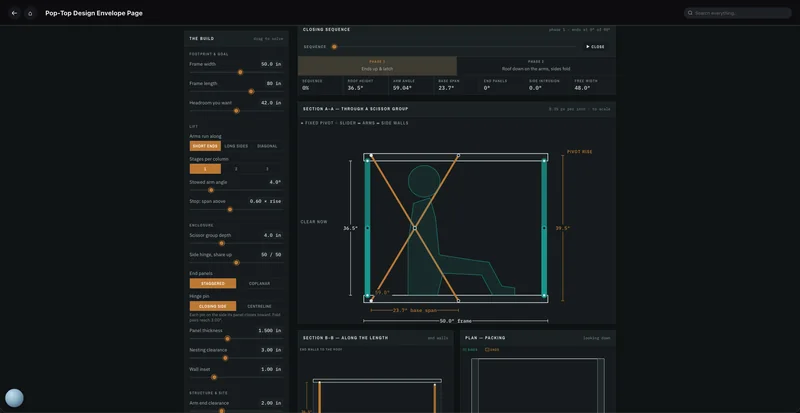
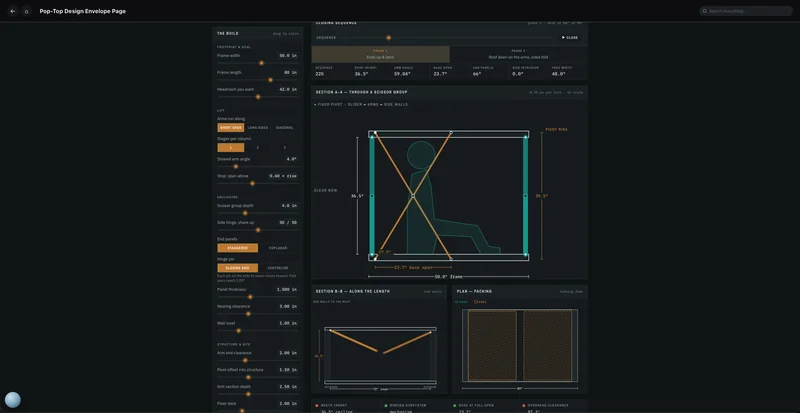
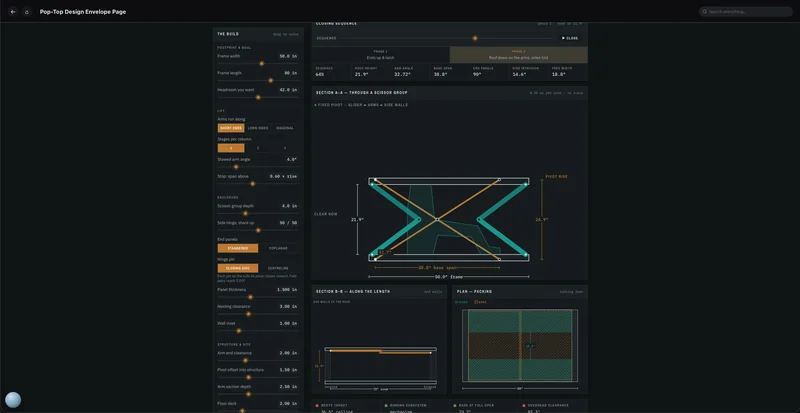
And it writes the tools it needs. This pop-top envelope solver did not ship with MyGarage and nobody sat down to code it. Point Claude or ChatGPT at your shop over MCP, describe the calculation you keep doing by hand, and it writes the utility and installs it here. Then it belongs to the shop: you open it and drag the sliders, and MyGarage runs it too while planning a build. Drag the sequence and the mechanism re-solves live — roof height, arm angle, side intrusion, how it packs — and every run is recorded with the numbers that went into it.
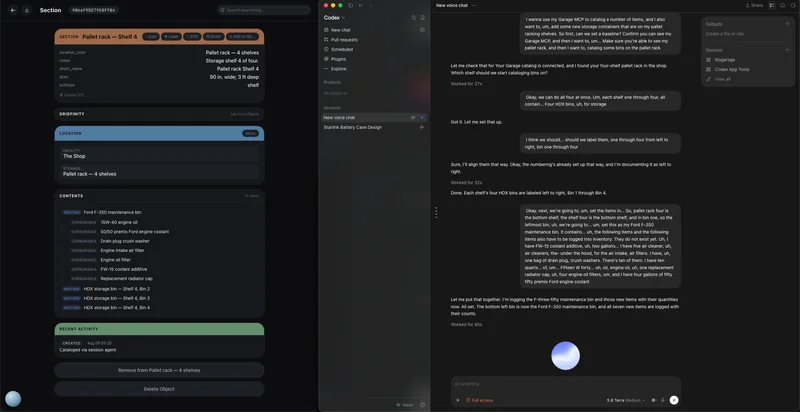
Two windows side by side: on the right a voice conversation with Codex about cataloging bins on a pallet rack; on the left the resulting MyGarage record for Pallet rack Shelf 4, listing a Ford F-350 maintenance bin with seven consumables inside it and three more HDX bins.
Bring your own assistant. On the right, a rambling voice conversation with Codex — sixteen bins across four shelves, then a spoken list of maintenance parts and how many of each. On the left, what MyGarage has when it finishes: Shelf 4, the Ford F-350 maintenance bin sitting in it, seven parts logged inside with their counts. Connect ChatGPT, Claude or any MCP agent to your shop and the work lands as records you own — not as a chat transcript you have to re-read.

Add what you want it to do

Free, open tools you can install — MyGarage finds them and turns on the features that need them.

Everything below is optional and none of it costs anything. Install one and the matching features appear on their own; skip it and they simply aren't there — nothing half-works, and nothing nags you to buy an upgrade. Settings shows you what it found, what it didn't, and what each one would add.

One of them takes you off the grid. Speech in and speech out already ship with MyGarage, so Ollama is the only thing standing between you and a shop assistant that listens, thinks and answers with no internet connection at all.

TracefinityPhotograph a tool and get a Gridfinity bin cut to its outline.
Docker, free
OpenSCADGenerates 3D models — bins, fixtures, the scale model of your shop.
Free, all platforms
TesseractReads scanned manuals and photographed pages. Without it they still file, but nothing inside them is searchable or citable.
Free, one brew command
OllamaRuns AI models on your own machine instead of sending work to a provider.
Free
gitTurns firmware and scripts into shop objects, versioned like any other record.
Free · one command on macOS
MoonrakerTalks to a Klipper 3D printer — live status, and printing straight from a project.
Already on your printer
TailscaleReach your shop from anywhere, with a real certificate and no ports opened.
Free tier

Open iron

Open-source controllers for the physical machines in your shop — and the MyGarage side that makes them useful.

We open-source the machines we build for our own shop. The firmware is MIT-licensed, so anyone can build one — ported to the Arduino and ESP32 boards you already have in a drawer, and every one speaks the MyGarage machine contract out of the box. The other half — the machine page, saved presets, the wall view, the phone notification when a run finishes — comes with MyGarage, and each new controller lands there as an update. No add-ons, no per-machine fees.

Powder coat ovenTwo-processor safety design: an Arduino Mega owns the elements, an ESP32 runs the touchscreen and talks to MyGarage. Runs ours daily.
Shipped · MIT
CNC routerController UI for a FluidNC/Grbl router — the LowRider-class build — with jobs staged from a project and status on the wall.
Roadmap
CNC plasmaA fold-away plasma table on an ESP32-S3 running FluidNC, cut files straight from the plan's DXF.
Roadmap
Air compressorDuty-cycle, drain and pressure control with run hours feeding the service schedule.
Roadmap
Shop climate & energyMini-split control, temperature and humidity probes, door sensors and energy metering — with an equipment-protection floor that outranks the power price.
Roadmap
Sensor podFor closed-brand printers and lasers with no public API: an ESP32 that reads what the machine won't say, so it still shows up as a real machine.
Roadmap
Vehicle telematicsAn OBD-II dongle that feeds mileage and fault codes to the vehicle's service record.
Roadmap

Roadmap items are in the order we need them in our own shop. No dates until they run here.

No subscription

One purchase. No remote account can lock you out — the software and your records stay usable on your machine, and your data sits in a standard, exportable database on your disk.

Core functions work offline

Inventory, projects, manuals, and local AI stay available with no internet. Cloud AI and web discovery need connectivity — and only when you use them.

Your records stay home

They live on your machine. Information leaves it only when you invoke a cloud model you configured yourself — with your API keys, on your terms — and only what that request needs.

Who's building this

I'm Scott Watson, and MyGarage runs my shop in Mesa, Arizona — fabrication and restoration, one bay at a time. I built it because I kept losing the thread between the manual I'd read, the tool I owned, and the decision I'd made three weeks ago. Every screenshot on this page is the real thing from that shop: the oven, the truck, the booth, the bins.

It's a small operation and I answer the mail myself: info@mygaragehub.com.

Price

MyGarage · Early-adopter pricing

$49 once

Launch price for early adopters — it will go up. What you buy now is yours forever.

  • Everything included — inventory, projects, knowledge bases, voice, machines
  • Updates included through the 1.x series — every 1.x release arrives as we ship it, not behind a renewal. What you have keeps working regardless
  • Mac (Apple Silicon) at launch, Windows next
  • AI features are bring-your-own-key — your accounts, actual usage rates; or run local models for free

Be first in the garage